Mediawiki
Overview
This chapter is not a Mediawiki Tutorial. It focuses on the integration of Mediawiki with Tuleap. If you are not familiar with Mediawiki we warmly advise you to first read some of the documents listed in the references section (see Mediawiki References).
The Mediawiki version provided by Tuleap is 1.20. As of today, this Mediawiki has no plugin deployed.
There is one instance of Mediawiki per project. Tuleap manages the connection to Mediawiki. A Tuleap user has access to the Mediawiki service in any project he is able to access (and which has activated the service), so you don’t need to register on Mediawiki.
Restricted users will have access to Mediawiki from projects they are members of. If they aren’t, they won’t be able to access Mediawiki from public or private projects.
Permissions
Note for long time Mediawiki users. Contrary to default Mediawiki, in Tuleap ‘anonymous’ can only Read pages (they cannot create nor edit).
As of today, when you have a public Tuleap project, you cannot block anonymous users to browse the pages.
Should you need to have a private Mediawiki, you should switch your project to Private.
Mapping between Tuleap and Mediawiki user groups
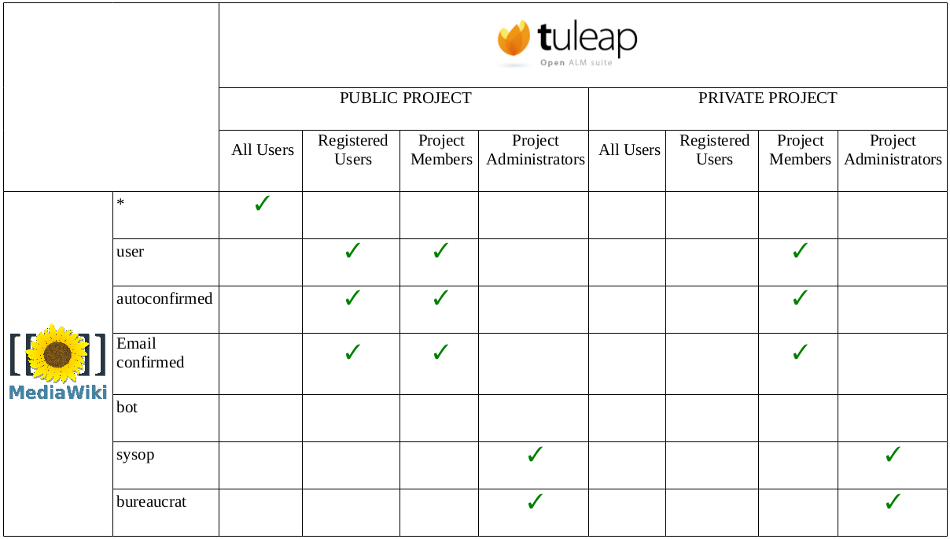
There is a default mapping between Tuleap and Mediawiki default user groups.
Users added in Tuleap groups will be automatically added in corresponding Mediawiki groups. It is no longer possible to add users in Mediawiki groups directly from Mediawiki.
For instance, by adding a user in your project, he will be added in the user, autoconfirmed and emailconfirmed Mediawiki groups. This is fully transparent for users and project adminstrators. As of today, there is no way to create a custom mapping from the Mediawiki service.
This default mapping is defined as above:
As a project admin you can also define your own mapping between Tuleap and Mediawiki groups.
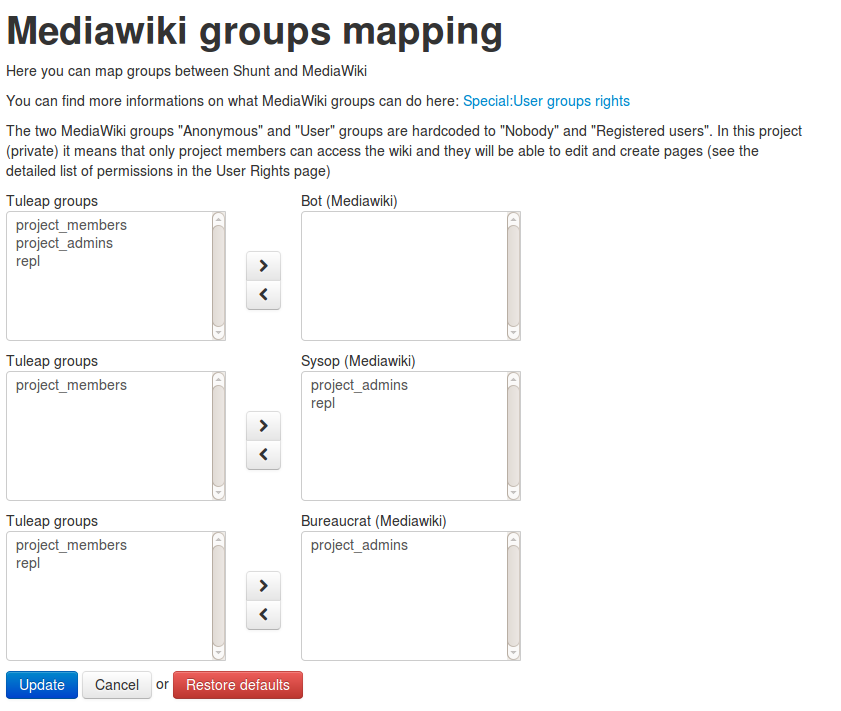
Please note that it’s not possible to assign Tuleap special ‘all_users’ and ‘registered_users’ to Mediawiki groups.
More details on Mediawiki groups and permissions: http://www.mediawiki.org/wiki/Manual:User_rights
Synchronisation for Mediawiki users and groups
In order to have fully relevant users and groups in Mediawiki, the synchronisation is launched when the following actions occured:
- Tuleap user is removed from project member
- Tuleap user is no more administrator of the project
- Tuleap user is renamed
Mediawiki extensions
Tuleap integrates the following Mediawiki extensions: - SyntaxHighlight_GeSHi (http://www.mediawiki.org/wiki/Extension:SyntaxHighlight_GeSHi): it allows to display formatted source code with the tag
- PdfBook (http://www.mediawiki.org/wiki/Extension:PdfBook): it lets you compose a book from articles in a category and exports as a PDF file.
- ParserFunctions (http://www.mediawiki.org/wiki/Extension:ParserFunctions): it enhances the wikitext parser with helpful functions, mostly related to logic and string-handling.
- WikiEditor (http://www.mediawiki.org/wiki/Extension:WikiEditor): it offers an editing interface. This extension is only available in compatibility view.
Compatibility view
In order to accommodate for mediawiki plugins that are not compatible with Tuleap’s window rendering there is an option to enable a compatibility view. If checked and if the site administrators have set it up then the mediawiki in that project will take a standalone appearance. There will be links on the sidebar that will bring you back to your project area.
Displaying your project’s logo in Mediawiki
The following conditions have to be met for your logo to be displayed in Mediawiki:
- The logo must be named
.wgLogo.pngexactly (notice the dot prefix). - It must be located in
/var/lib/tuleap/mediawiki/projects/<project-id>/images/. Ask your site administrators to upload it there for you. - Its height and width should be 155px x 155px but can be smaller or larger, as it will always be adapted to these dimensions.
Mediawiki References
- The official Mediawiki documentation: See http://www.mediawiki.org/wiki/Documentation